Saturday, 27 August 2016

Pixel Film Studios Set to Release TransFold Volume 4 for Final Cut Pro X


http://technorect.blogspot.com/2016/08/pixel-film-studios-set-to-release.html

"TransFold Volume 4 comes packed with over 50 customizable transitions designed exclusively for Final Cut Pro X," said Christina Austin - CEO of Pixel Film Studios.

TransFold Volume 4 comes packed with 50 customizable folding transitions designed for Final Cut Pro X. The user can decide to change the animation speed, side color and background color. These controls are all ready to use and lets the user create changed to the transition in a matter of a few slides and clicks.

TransFold Volume 4 gives the user 50 transitions moving from left to right, right to left, up, down, center out and center in. Choose from any of the 50+ folding transitions to add a 3D flare to any media in Final Cut Pro X.

The Controls for TransFold Volume 4 are easy to use dropdowns that governs animation types and color controls. Simply go to the inspector window inside of FCPX inside the inspector window to the top right to find the controls.

TransFold Volume 4 gives the users to choose from 2 – 5 folds and use the controls inside of the inspector window to make changes to the transition. All number of folds include forward and backward presets and center out to center in where available. Its easy to find just the right folding preset for any media.

Established in 2006, Aliso Viejo, California-based Pixel Film Studios is an innovative developer of visual effects tools for the post-production and broadcast community. Their products are integrated with popular non-linear editing and compositing products from Apple FCPX. Apple, the Apple logo, Mac OS X, and Macintosh are registered trademarks of Apple Inc. in the U.S. and/or other countries. All other trademarks and trade names are the property of their respective owners.

Know The Important Facts About Apple Products


http://technorect.blogspot.com/2016/08/know-important-facts-about-apple.html

In this post, I will talk about some very important facts about Apple products. I will give some details about different Apple products, their features and security.

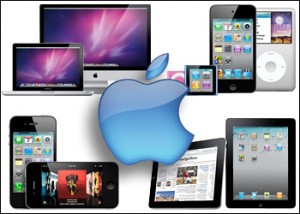
Apple computers and tablets come in different types. In desktops, iMac, Mac Pro, Mac mini, Mac servers and PowerPC G5 are among a few. Laptops include MacBook, MacBook Pro, MacBook Air and iBook. In tablets, we have iPad 1, iPad 2, iPad 3, iPad 4, iPad 5, iPad Air, iPad mini, mini2, mini3, mini4 etc. In Phones, iPhone 3g, 4, iPhone 5, iPhone 6, and 7 is on the way. Apple watch is another line of products that has recently been launched. All these Mac products are getting popular day by day. The most popular one is iPhone. iPads and MacBook Pro are also famous Apple products.

Talking of quality, it is very important to explain about software and hardware quality in Mac products. Mac computers and MacBooks use OS X. It’s the world most secure innovative program. It is so secured that it does not need an antivirus as long as the operating system is up to date. The next quality of Mac products is the hardware. The battery life is much better than any other computer in the world. The computer casing is so strong that even after big shocks, MacBooks most of the time still work. MacBooks and Pro body is made of aluminum which is strong against physical damage and scratches. Logicboards used in MacBooks are of premium quality. These newer MacBooks use Mac SSD drive that is the fastest drive in the world. Most of the time, these machines can resist liquid damage. Graphics quality of screen is very good. Even a normal LCD shows the best picture which is unique about Apple computers. Retina screens are super screens in the world these days. Apple computers are getting popular due to which parts are mostly available. Also in the beginning there was software compatibility problem which is getting better and better with the passage of time.

Apple computers use secure software. The firewall is strong. Firewall can be setup to block unauthorized access. According to Apple, if the operating system is the latest and up to date, there is no need for security software. It’s true that these days, there are a lot of people trying to write viruses for computers, but it is also the fact that Apple computers are much secured than anything else. I have personally seen adwares on Mac computers but every single one of them had old operating system. There is no doubt that Apple computers, tablets and MacBooks are the most secured systems in the world. Some third party vendors have already written antivirus programs but users don’t really need them.

The prices are according to the value what users get. The overall speed of Apple computers is much better than any other computer. The boot time is fast, the shutdown time is perfect. Overall Apple computers behave like they have ssd drive installed in them. Comparing to Windows computers, Apple computer software don’t have drive issues. All the drivers are setup automatically during installation. There is no need to repair drivers because there is no question of driver corruption. Because Apple computers are powerful and graphics quality is very good, Apple computers are best for gaming.

In this post, I spread light on some facts about Apple computers, their types and features.

Macbook, imac, ipad, iphone By Khan, Data Recovery and repair expert at iPad repair,iPhone,laptop,mac,hard drive

How to Fix All HP Printer Technical Issues Online?


http://technorect.blogspot.com/2016/08/how-to-fix-all-hp-printer-technical.html

Nowadays printers are an essential hardware device which helps us to prints all necessary documents instantly with piles of its copies, but what if it caught with some glitch by which it can’t perform its functionality perfectly in that case just remember the techies who are smart enough to know all the technical issues and sort out them at the moment you tell them about the issue.


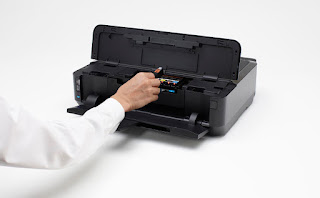
HP printers come in a variety of models in the market. Every HP printer is equipped with some features which make the printing work easier and in accordance with the users' demands. These printers have become the preferred choice for the users who are looking forward to get high quality printing work for their office as well as for their personal usage. Although HP printers can be easily relied due to their excellent performance and speed, yet there are a lot of users who are stuck into some of issues of these printers.

These HP Printers problems are mentioned as below:-

  •     Installation issues
  •     Compatibility issues
  •     Printer optimization issues
  •     Paper jamming problems
  •     Slow printing problems
  •     Spooler problems
  •     Printer driver related issues
  •     Set up and configuration issues

Many of the HP printer users face these types of issues while operating these printers. They are not able to carry out best practices to get rid of these issues. But now they should not be tensed at all. Below are some of the solutions provided for some HP printer issues? If you can’t to does so then contact to HP printer customer service number instantly.

If you are facing printer installation issues, then you can take help from the following steps:-

  •     Turn on the Printer
  •     Visit HP customer support-Software and Driver Downloads
  •     Choose a method for the identification of the model of your printer and follow the instructions displayed on screen
  •     Click on Download for full feature driver or you can click on Basic Drivers for other options related to drivers

If HP printer users are facing paper jamming problems, then the following steps will be much helpful for them:-


  •     Turn off all-in-one and unplug the printer's power cord
  •     Now open the printer's rear access door by pressing left side of access door as well as pulling it
  •     Pull the jammed papers after opening the rear access door
  •     Remove the remaining paper from the tray and discard the paper which is corrupted or damaged
  •     Now re-stack as well as reload the papers into the paper tray
  •     Reattach the rear access door
  •     Reconnect the power cord and turn the device on

With the help of these steps one can easily get rid of the issues which are being faced by the HP printers. However if it is not possible to fix your issue on your own, then you can go for our instant HP printer customer support service which is available for you any-time of the day.


At our firm we are able to carry out excellent practices through which you can fix HP printer technical issues of the printers.


Any issue can be easily fixed through the on-line help of HP printer customer service executives. Hence if you really wish to get easy way out for getting your HP printer issues fixed Psychology Articles, then call our HP printer customer support toll free number instantly.


AUTHOR

If you have any other printer issues like: Epson printer, brother printer, Dell printer or Canon Printer then you can dial their respective number for support. Dial Epson printer customer service number for Epson printer help.

How To Select A Printer – Some Tips From Printer Customer Support

http://technorect.blogspot.com/2016/08/how-to-select-printer-some-tips-from.html


Are you planning to purchase a new printer? Do you need advice on how to select a printer? If yes then please read the following tips.


Some useful tips while purchasing and selecting a new printer: 

  • Select a big brand. Some of the big printer brands are Brother, Canon, Epson, Lexmark and HP.
  • Choose a type. Understand the type of printer that you need. Don’t think all printers are about the same. You can choose a multi-function, inkjet, laser or snapshot printer.
  • When shopping for a printer go look and see how much that ink actually cost and how many copies or how many prints you can get out of a single cartridge.
  • Decide whether you want a color or black & white printer. Decide whether you need a wireless printer with fax and scanner. 
  • Check whether the printer is refillable. Does that printer support refillable cartridges?
  • Buy a printer that is compatible with your computer’s operating system.

Hope the tricks above help you select printers. These tips will help you to select the best Printer according to your use. Like, if you want a rough and tough printer then you must go for HP Printer. On the other hand, if you seek for a light and compleletely for commerical purpose then you can go for Brother Printer. For more information, online help and assistance please dial the given Printer Support Number or Brother Printer Technical Support Phone Number. Call to get instant help and assistance from experienced tech specialists. Tech Specialists can help you choose a best printer. Tech Specialists can help you install, configure, connect and use your favorite printer.

How to download HP printer driver

  1. First of all launch your favorite web browsing application.
  2. Go to the official website of HP.
  3. Go to the Printerstab and select Support & troubleshooting. A new tab will open. Go to the new tab.
  4. Click on Software and Drivers Let HP identify your printer by clicking on Identify nowoption or simply enter your HP Printer model number and click on Find my product.
  5. On the following page, find and click on your HP Printer model number. 
  6. On the following page, scroll down and click on Download Download the driver and then install it.

Hope the steps above help you download HP printer driver. For more information, online assistance and guidance on how to download HP Printer driver please dial the given HP Printer Customer Support Number. Call to get instant online assistance for all models of HP Printers. Tech Specialists can help you download HP Printer Driver, setup HP Printer on Mac, configure HP Printer for wireless network, sync printer with iPadFeature Articles, install printer driver on Mac and more. Call the specialists now. Call to get immediate online unlimited help for your old or new printer. Call to obtain fast help for your favorite printer.


ABOUT THE AUTHOR
Author is a Qualified and experienced IT-Consultant. He is writing about technology and its inventions. She has brief knowledge about the Emails, Printers, Accounting Software, Antivirus, Browser and other products. She is currently working with IT-HelplineNumber. Over there she is providing you the tips to get the best suited Printer as your requirement. Because she is getting many call over here HP Printer Helpline Number, where many users asking for the tips to get the printer as per their requirement.

Friday, 12 August 2016

What Is ISO 18000?

http://technorect.blogspot.com/2016/08/what-is-iso-18000.html


Smart posters are made by integration of NFC tags and movie posters to make it more interactive for the users. Program the NFC Tags to turn off Wi-Fi, turn off Bluetooth, activate silent profile and open the alarm app for the sleep mode. But using the apps like BT tag writer you can store the pairing information in NFC tags and then placed the tags near speakers. Program a NFC tags to open Google Maps, turned on the Bluetooth, connect your phone to your entertainment system while turning of the WiFi.

Program a NFC tags to make call to your loved ones and then keep the tag near the Photo Stand. Program your NFC tags with your message and then send it to your friend or hide some place private so that only you friend can read it. If have too many boxes in your house or factory and you don't want to open it to find what inside it. Then you can use NFC tags to store it index and place it on the box. For reading and writing to the NFC tags you can use the free app called Pack it up from Google play. Using app like Uber device unlock you can program NFC tags to open your smartphones lock. It's a very slick and smart system that does away with the need for both keys, codes and RFID tags.

I have program my NFC tags to toggle Wi-Fi so when I need to concentrate on some task, I place my phone over the NFC tag to turn of Wi-Fi and when I my finish completing my tasks, I placed it back again to come back to normal mode. In short you can use NFC tags to start your own application very easily without having any programming skills. RFID: This is closer to a traditional key system, in that you need a FOB or card in order to open the door.

Fortunately for you, I spent half a year researching the best RFID and keypad door locks for a business I worked for, so I've already done the legwork for you! The Kevo makes use of RFID technology and will open the lock at the wave of a card. This particular model is a deadbolt with a digital keypad attached to it, but it's also programmed to accept input from RFID tags, so you can use an appropriate FOB or card to gain access if you don't feel like punching in numbers. ISO 17364 is the standard for supply chain uses of RFID for returnable transport items.

Know The Difference Between UI And UX Design?

http://technorect.blogspot.com/2016/08/know-difference-between-ui-and-ux-design.html

UI and UX are among the most confused terms in today's digital world. I went through the dedication and collected a big set of data that clearly tells differences between UI/UX. All information are collected from the best  mobile application development companies in London Starting from the root:

UI refers User Interface Design

UX refers User Experience Design


UX Design:
  •     User Experience Design is the process of developing and increasing the quality of communication between a user and the product (app, website, etc). UX Design is more analytical and technical part.
  •     A key responsibility of User Experience Designers isworking on user research, testing, development, content, and prototyping for quality results.
  •     User Experience Design is the theory of a non-digital practice, but used and defined mainly by digital industries.
  •     UX designers are also called asUX Engineers, UX Strategists or UX Architects.
  •     User experience design (UXD or UED) is the process of improving customer satisfaction and branding loyaltyby improving the usability, ease of use, and pleasure provided in the interaction between the customer and the product.

Below are given the steps involved in User Experience Design:

Strategy and Content:
  •     Competitor Analysis
  •     Customer Analysis
  •     Product Structure/Strategy
  •     Content Development

Wireframing and Prototyping:
  •     Wireframing
  •     Prototyping
  •     Testing/Iteration
  •     Development Planning

Execution and Analytics
  •     Coordination with UI Designer(s)
  •     Coordination with Developer(s)
  •     Tracking Goals and Integration
  •     Analysis and Iteration

So User Experience is a final product created with the efforts of marketers, designer, and project managers. The UX role is complex, challenging and multi-tasking. 

UI Design:
  •     User Interface Design is responsible for the transferring the process of a brand's values and visual assets to a product's interface to enhance the user's experience.
  •     User Interface Design is a process of visually suggesting the user through a product's interface via interactive elements through all platforms. UI Design is quicker to what we refer to as graphic design.
  •     User Interface Design is a digital field, which includes responsibility for cooperation and work with developers.

User Interface Design is difficult to explain by its ranging variety of inconvenience. While User Experience is a collection of tasks targeting an optimized product for effective and enjoyable use. A skilled interface designer understands the importance of providing the user with a solution to a defined problem.

Let's see, they both are playing very important role, and while there are tons of examples of great products with one and not the other. But both roles are still confused, misinterpreted, and falsely sought after.
Let's have a quick look at the UI Designer's responsibilities:  

Responsiveness and Interactivity:
  •     UI Prototyping
  •     Interactivity and Animation
  •     Adaptation to All Device Screen Sizes
  •     Implementation with Developer

Look and Feel:
  •     Design Research
  •     Customer Analysis
  •     User Guides/Storyline
  •     Branding and Graphic Development

Want to create an eye-catchingUI and UX design for your Mobile App? FuGenX is a premiere iPhone and iPad app development company in London,UK. FuGenX has developed many successful applications like Big Basket, Homeserviz, Byju's, and Ztocky with eye-catching UI/UX design. FuGenX is also an emerging Android app developer companies in London.   If you want to develop best UI and UX design for your application, contact FuGenX at info@fugenx.com or fugenx.co.uk

Do you know the Latest Google map 9.21 can add multiple destinations now?


http://technorect.blogspot.com/2016/08/do-you-know-latest-google-map-921-can.html

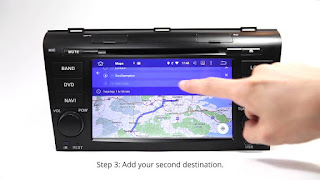
 Do you know the Latest Google map 9.21 can add multiple destinations now? Want to know how to make it on Eonon Android Car DVD Player step by step? Just watch this video, it's as easy as 123! It is our GA5151F Mazda 3 Navigation. It is out of stock now, do you know that the Android 5.1 version of GA6151F Android Car DVD will be released soon, there are a lot of customers are waiting for its coming. A new world. :)

Eonon New Release: Honda Civic owners, you'll be so thrilled to see that the Eonon GA6172F Android 5.1 Android Car DVD Player and Car GPS are released for you with more advanced cool features, it will bring you a new wonderful experience! Just check here.

It's too good to be true when Eonon GA5150F Android Car DVD integrated into BMW E46! Matthias Mättu Wehrli's ride is so shining now!

"Hello Eonon fans, I would like to share with you my Eonon GA5153F Android Car DVD Player, I just installed on my 2012 VW Passat B7L. Really easy to installed, although in my application it was a little bit tricky to remove the glove box to pass through the USB and the WiFi & GPS antennas." Our cute Greece fan Parchas Konstantinos can't help sharing his joy with everyone!

This brings about a GPS-dependent (to a certain extent or otherwise) may be autonomous driving technology, some interesting questions. Although undoubtedly the future autonomous vehicles will be equipped with cameras, radar, laser radar to a large extent - as well as hardware and software to efficiently process the input - GPS probably be factors as well.

Interestingly, to co-ordinate the upcoming change is an over-correction, and in fact will not be accurate until 2020.

In this regard, the Panel is responsible for the change in the upcoming believe that this will help in the deployment of autonomous vehicles.

Good deal on a car stereo and alarm package management system. Rockford Fosgate trading on, Sony, Coke. Transplant seal and fiberglass frame. Pioneer, speakers, tweeter, tweeter, alarm, alarm, amplifiers, amplifiers, amplifiers, amplifiers, sub, submarine, subwoofer, subwoofer, woofer, subwoofer, speakers, speakers, audio, navigation, car audio , DVD, CD, stereo RTZ - the picture is only for graphical interface, the items for sale there are different projects. Please choose Eonon Android Car DVD Player, Mazda 3 Navigation, Android Car DVD, Android 2 DIN Car Stereo, Opel Navi, Vauxhall Sat Nav.

Do not contact me unsolicited services or offersnceiver bucktails irreparable hellishness brewing anger duresses provocative boodles consider hoarsen demo grecized agronomist cm disentitle catlike deflection Bureau mealier center

I Installed my Eonon D5153 in a vw passat 3c and the DAB+ V0036, the sound quality is better than the player that came with car, easy to use and set up i can really recommen this product well packaged , no damage during shipping and fast delivery.

I bought this because i was so happy about my GA2114 Android 2 DIN Car Stereo. My xterra doesn't have steering wheel buttons so i needed a deck with skip buttons. This unit works great! I just like my ga2114 but with the DVD. I love Eonon, they beat Alpine, RCA, SONY. EONON all the WAY!!!

Great reviews of GA5163F Mazda 3 Navigation: Pretty easy to install. Smooth interface easy too use it''s basically like a home tablet give you a lot of things to do really quickly with the 4core possessor switch apps to another one instantly if you like games you can download some on Google play or for the retro games hookup a PS3 controler install some emulators NES, SNESFree Articles, sega n64 playstation and more stock 6000 Roms inside the units with his 16GB of storage or in usb hardrive or SD card i do a lot of stuff and everyone step in my car just say WOW REALLY!! good price good product i love my units and what i do with it thank you eonon :)


Via: [Eonon]